ElectronView Electroluminescence Quantum Yield Test Software
ElectronView
Software v2.3.9Keithley 2400 and 2450 source meters; full Ocean Optics spectrometer range
ElectronView is the professional measurement software for LED electroluminescence quantum yield test systems. It measures luminance/radiance, EQE, CE and peak wavelength versus current density or voltage in real time, automates measurement of up to 8 LED light-emitting points, supports T70/T50 (customizable) lifetime measurement, and supports source meters such as Keithley 2400, 2450, 2611, 2614, 2636 and Keysight 2901, 2912, either for automatic EQE measurement or independent source meter control.
Software Overview
ElectronView is the professional measurement software developed by Pynect for LED electroluminescence quantum yield test systems. It measures in real time the curves of luminance/radiance, EQE, CE, peak wavelength, etc. versus current density or voltage, and supports automated measurement of up to 8 different LEDs. The latest ElectronView 2.3 is the most feature-complete version with the best user experience — welcome to download and use it!
Special note: On first installation, the Ocean Optics spectrometer driver must be installed. Click to download.
The software supports the full range of Ocean Optics spectrometers and is compatible with source meters such as Keithley 2400, Keithley 2450, Keithley 2600 series, Keysight B2901 and Keysight B2902. If you need other source meters, please contact us for separate development support. It currently supports 64-bit Windows 7 / 10 / 11.
Core features:
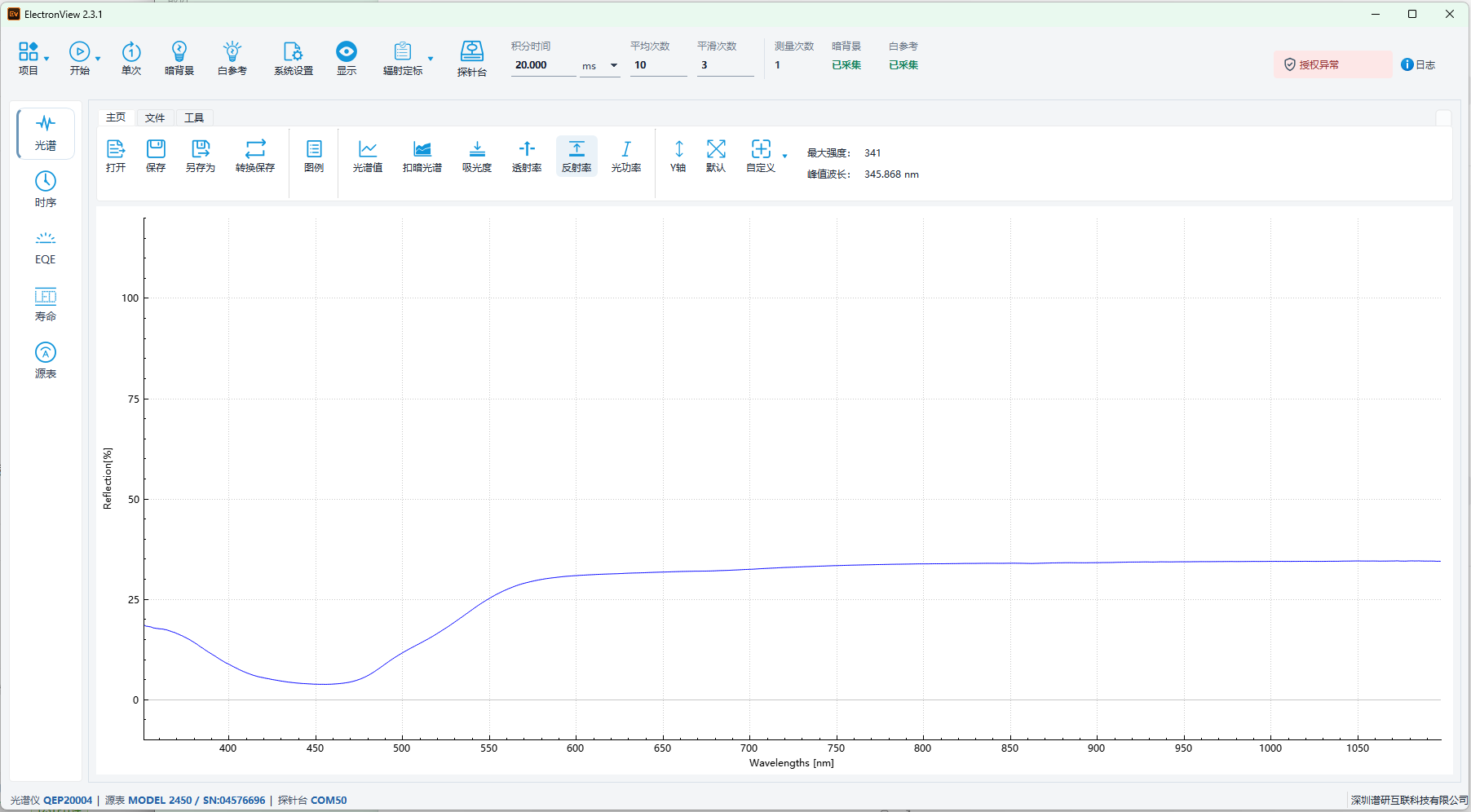
- Spectral measurement: raw spectrum, dark-subtracted spectrum, optical power, reflectance, transmittance, absorbance, peak wavelength, FWHM, etc.
- Time-series measurement: measures a specified wavelength or range over time, auto-saves data, and supports multiple measurement modes.
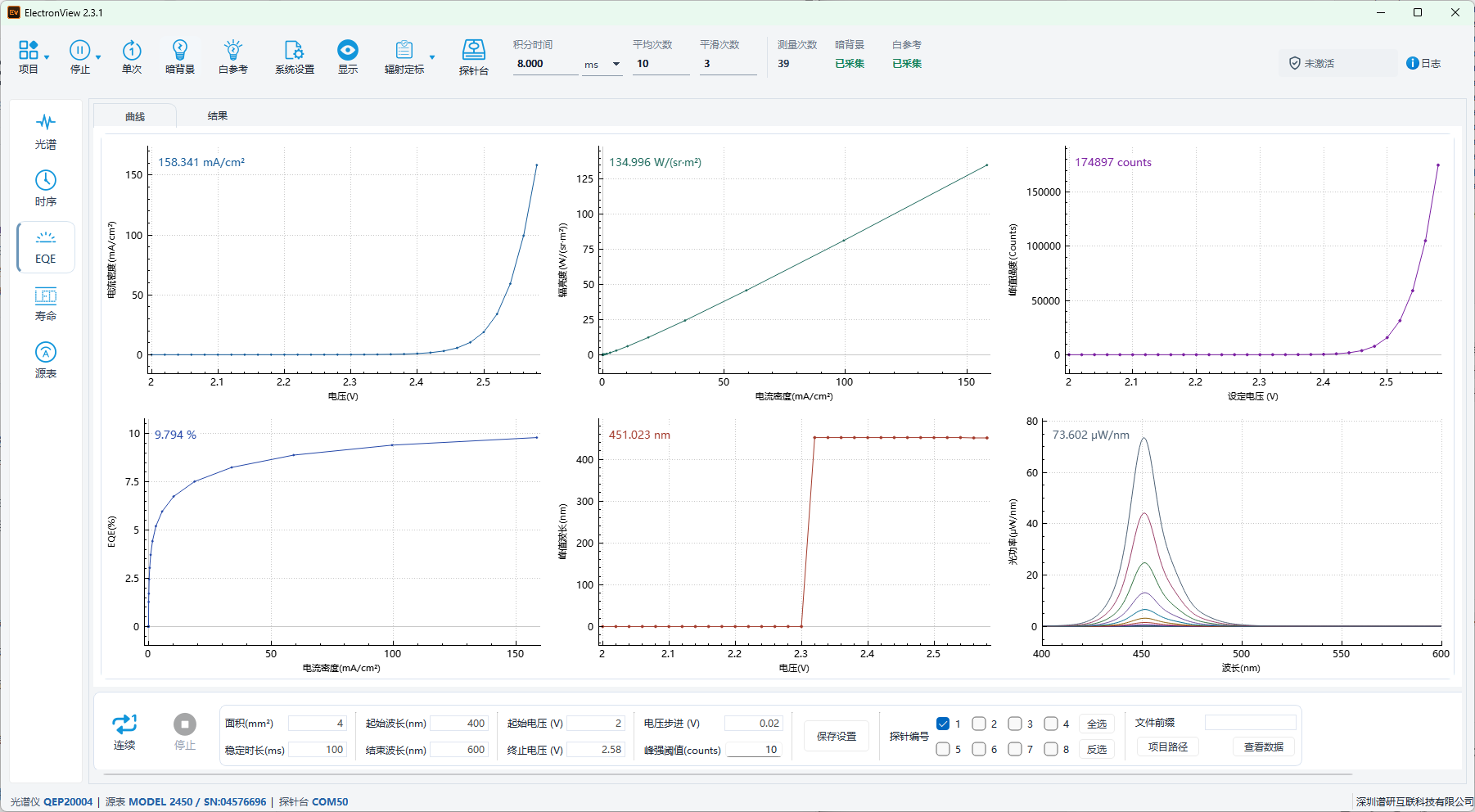
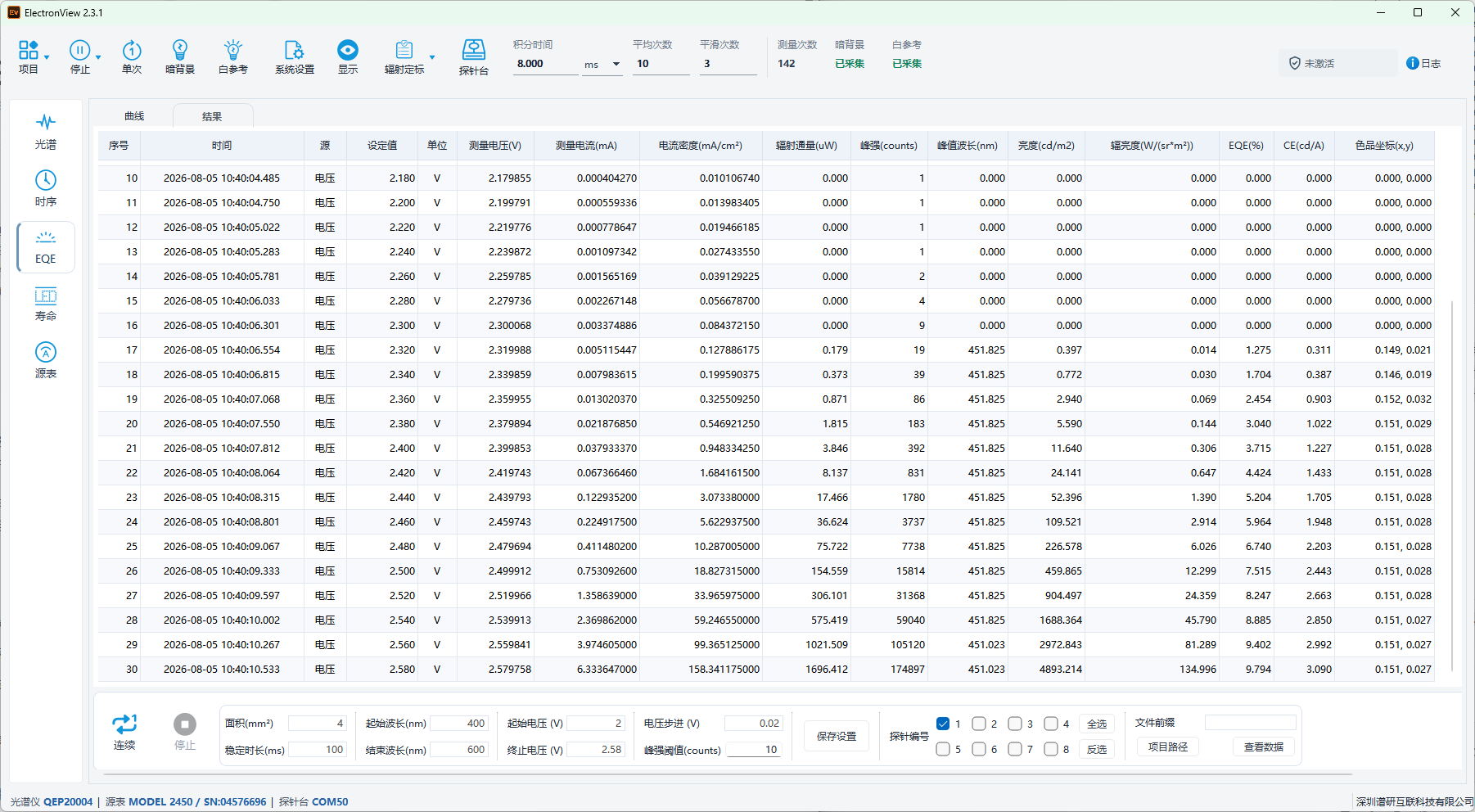
- EQE measurement: real-time measurement of the IV curve, luminance distribution, optical power curve, EQE, peak wavelength, chromaticity coordinates, etc. as voltage or current is stepped; supports data export.
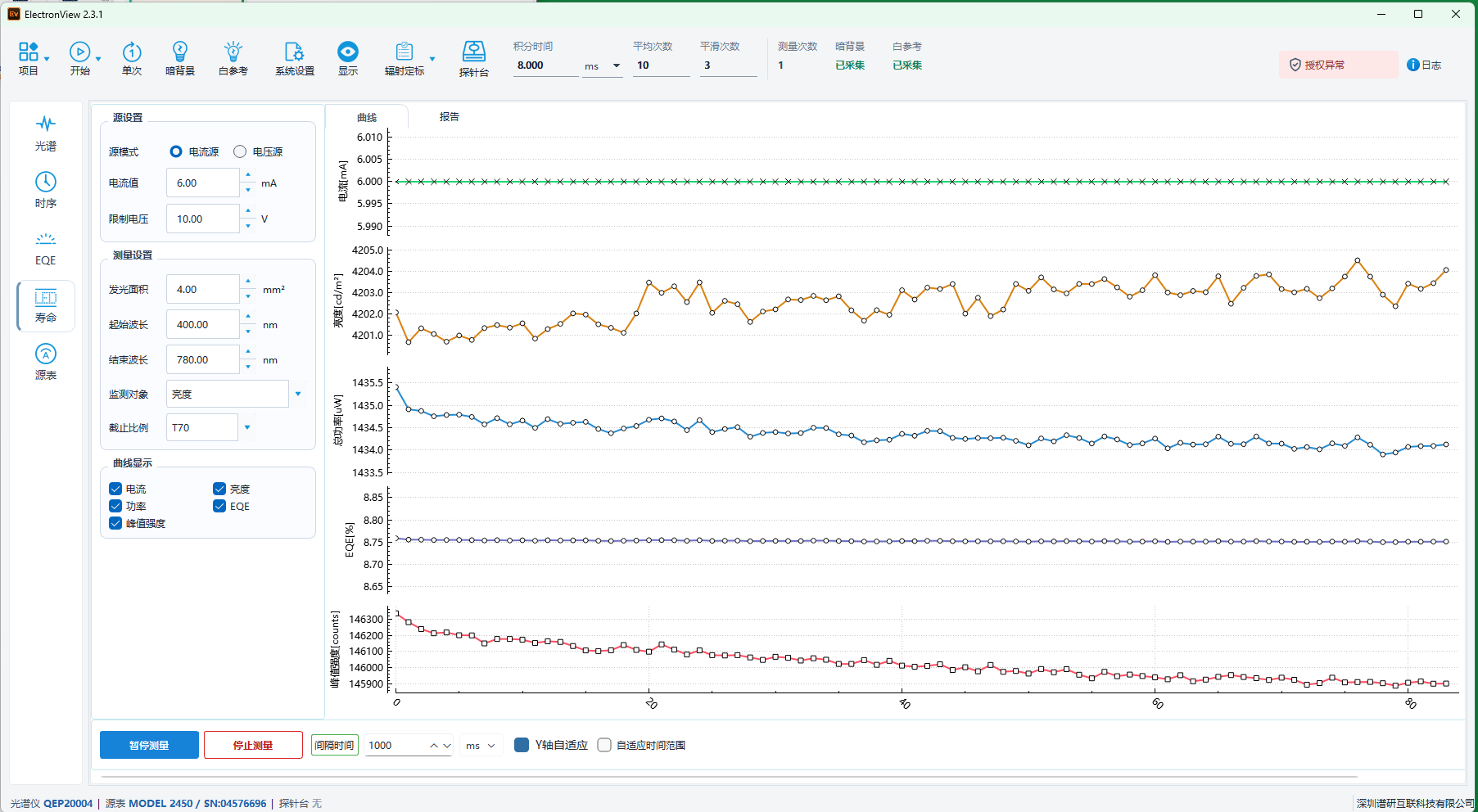
- Lifetime measurement: at a specified voltage or current, measures the lifetime until luminance, EQE, optical power, etc. drop to a specified proportion over time, such as T90, T70, T50.
- Probe control: the software can control the probe station to light up the LED with a specified number, support multiple or select-all probe numbers, and measure all light-emitting points in one click.
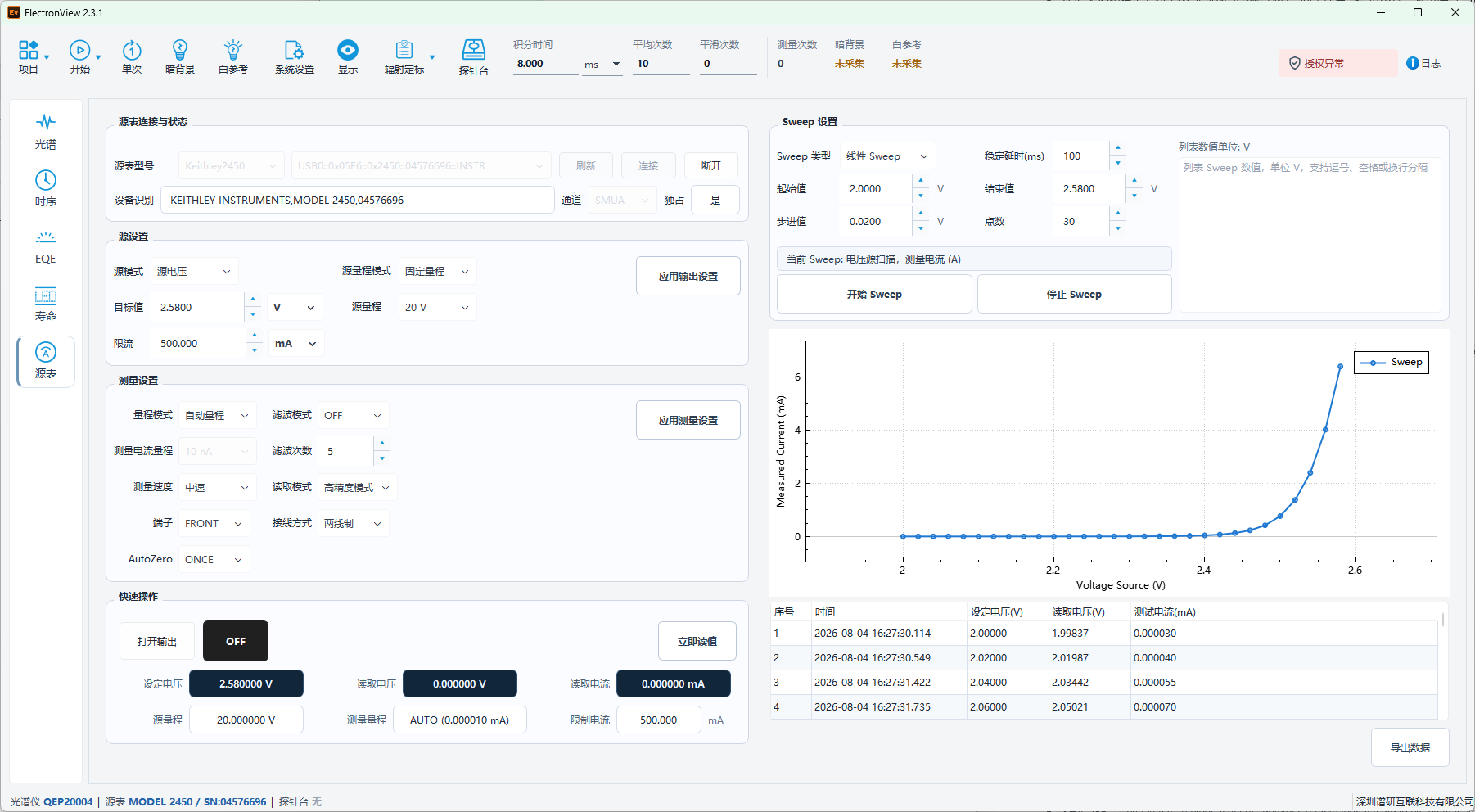
- Source meter control: supports source meters such as Keithley 2400, 2450, 2611, 2614, 2636 and Keysight 2901, 2912; can be paired with automatic EQE measurement or control the source meter independently.
- Data saving: data from each step test is saved to the
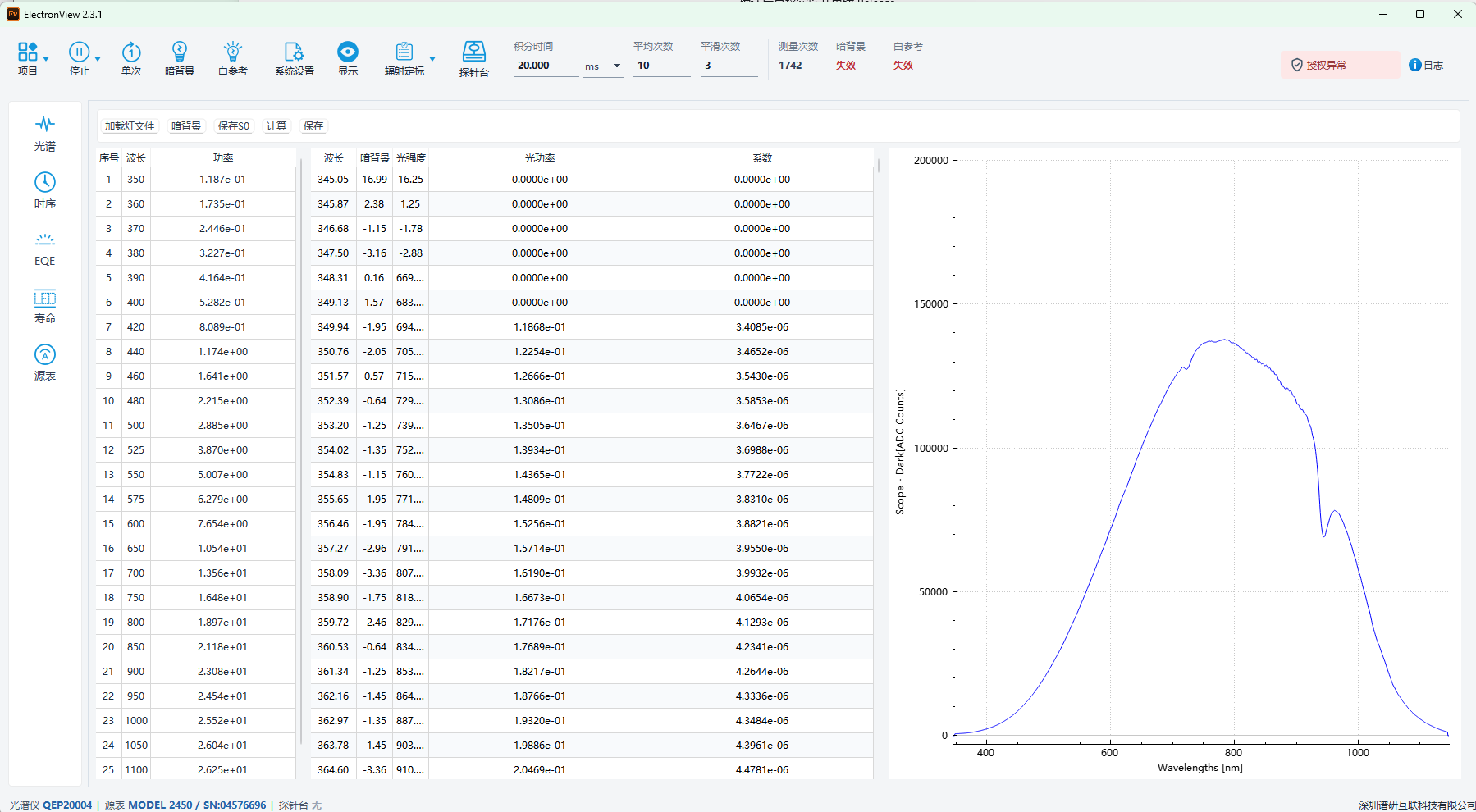
datadirectory of the experiment project path. Saved data includes 4 files: the EQE test result data table, 6 EQE test curve screenshots, and the complete spectral distribution tables of optical power (radiant flux) and dark-subtracted spectrum for each step.
Changelog
ElectronView 2.3.6
Release date: 2026-09-06
Download link: ElectronView-x64-2.3.6-setup.exe
Updates:
- Added a simulated-spectrum demo mode for use when no spectrometer is connected
- When no spectrometer is detected, the software still opens normally and displays a simulated spectrum (a composite curve of blue/green/red peaks), with a centered startup prompt explaining that demo mode has been entered
- Added a "Simulated Spectrum" indicator to the top toolbar (a compact badge placed between the white-reference status and the "Not Activated" license button; it is hidden automatically once a device is connected)
- All functions remain available in demo mode: Start (continuous refresh), Pause, Single (refresh one frame and increment the counter), parameter settings and Save
- The quick-settings bar stays editable in demo mode (integration time / number of averages / smoothing passes)
- Simulation parameters: default integration time 10 ms, peak value about 20,000 counts; intensity scales proportionally with the integration time; refresh period = integration time x number of averages
- Fixed three startup crashes introduced by demo mode (empty wavelength array, null device pointer, and a dangling timer reference)
- Demo-mode Y axis: after startup it uses the default range (0 to 200,000) and no longer auto-scales with the integration time
- Fixed an issue in EQE measurement where clicking "Stop" and then "Continuous Measurement" no longer incorrectly shows the "spectrum frame wait timed out, this measurement has been terminated" message
ElectronView 2.3.5
Release date: 2026-09-01
Download link: ElectronView-x64-2.3.5-setup.exe
Updates:
- Added a device-status module. TEC cooling of the QePro spectrometer can now be switched on or off manually; it is enabled by default.
- Added source-meter monitoring during EQE continuous measurement. If the source meter is not connected, a pop-up notifies the user that it is not connected.
- Added probe-number monitoring for EQE measurement. If the probe station is not connected and a probe number is selected, a pop-up notifies the user that it is not connected.
- Changed the software startup behavior: if the spectrometer is not connected, a pop-up notifies the user that it is not connected, but the software interface can still be opened.
ElectronView 2.3.3
Release date: 2026-08-24
Download link: ElectronView-x64-2.3.3-setup.exe
Updates:
- Added one-click import of radiometric calibration files from the previous version. On the radiometric calibration screen, clicking "Import Legacy Radiometric Calibration File" automatically copies the radiometric calibration file from the previous version to the new one, so re-calibration is no longer necessary.
- Added a dark-background-not-saved prompt. If the dark background has not been acquired, clicking EQE continuous measurement automatically shows a prompt guiding the user to store the dark background; dark-background subtraction is a basic requirement for all spectral data calculations.
- Added a prompt to redo the dark background after the integration time is modified.
- Improved the button styles on the radiometric calibration screen for a better appearance.
ElectronView 2.3.2
Release date: 2026-08-18
Download link: ElectronView-x64-2.3.2-setup.exe
Updates:
- Added real-time monitoring for unexpected disconnection of the fiber spectrometer or source meter.
- Added default parameter configuration on first launch so that parameters achieve the best results during EQE measurement, friendlier for experimenters unfamiliar with source-meter and spectrometer configuration.
- Added a pop-up warning when the entered integration time is shorter than the spectrometer's minimum integration time.
- Added a "Display" button to quickly adjust the wavelength display range and save the setting, which is automatically loaded the next time the software opens.
- Fixed the issue where the sub-thread failed to exit after a connected spectrometer or source meter was disconnected, preventing the software from closing.
- Changed the default installation path: following Windows 10/11 conventions, the default installation path is now AppData, fundamentally solving the problem of configuration files being unreadable due to insufficient administrator privileges on some computers.
Known issues:
- Segmented integration time by supply voltage is planned. For high-luminance samples, as voltage or current increases, the spectrometer may saturate at a fixed integration time; in this case a larger integration time is needed at low light and a smaller one at high light. If saturation still occurs even at the spectrometer's minimum integration time, the simplest fix is to replace the fiber with a thinner one and redo radiometric calibration.
- 16-channel probe station support is planned to accommodate scenarios with more than 8 light-emitting points, extending one-click automated measurement to up to 16 points.
- No other issues found.
Release: ElectronView 2.3.1
Release date: 2026-07-31
Download link: ElectronView-x64-2.3.1-setup.exe
Updates:
- Added multi-channel round-robin EQE measurement. Multiple light-emitting points can be selected or all selected, and all selected numbers are tested in sequence for one-click automated measurement.
- Added selectable modes for EQE display curves. The 4 basic curves — current density vs. voltage (in current-source mode it is voltage vs. current), peak intensity vs. voltage/current, EQE, and optical power (radiant flux) — are retained, while luminance (VIS), radiance (VIS/NIR), peak wavelength and CE can be selected two out of four. Luminance is commonly used for visible light, and radiance applies to the full band.
- Modified the spectrometer dependency library. The original Omnidriver dependency was replaced with the latest Oceandirect, so users no longer need to download and install Omnidriver separately.
- Modified the interface layout. Measurement parameters such as integration time, averaging count and smoothing count, and status monitoring of measurement count, dark background and white reference, were moved to the top of the interface.
- Modified the peripheral management button to "Probe Station", adding an independent channel switch function for probe station operation.
- Added multi-channel round-robin EQE measurement. Multiple sample points can be selected or all selected, and all selected numbers are tested in sequence for automated measurement.
- Added EQE measurement result display items, distinguishing set values from measured values. The measured value deviates slightly from the set value inside the source meter; the measured value is used in calculations.
- Added buttons for quickly viewing the project path and measurement data.
- Restructured the lifetime measurement interface and functions.
- Added lifetime test conditions: T90, T70, T50 and custom tests.
- Selectable display curves.
- Added a report function after measurement completes, for statistics of measured lifetime, count, and voltage or current drop values.
- Added status bar display of the connected device serial number or COM port, indicating whether the device is properly connected.
- Added the function for each curve to display the current compensated measurement value, for more intuitive observation.
- Added a log function for quickly diagnosing device communication errors.
- Improved display resolution adaptation across different computers. The minimum supported resolution is 1920x1080.
Known issues:
- Insufficient resolution adaptation samples. There is a lack of samples for high-resolution monitor scaling on new computers; only 8 monitors with different resolutions and scaling were tested.
- The software has been released for a short time; only 4 customers were invited to test, and more customer feedback is needed for further refinement.
- Many source meters are supported; only Keithley 2400, 2450 and 2614 have been thoroughly tested. The Keysight series was only borrowed and needs to be returned promptly, so testing was insufficient and potential undiscovered problems may remain.
- Insufficient hot-plug support. If the user disconnects the spectrometer or source meter while the software is running and connected, the sub-thread may fail to exit automatically; the thread must be exited manually or the computer restarted.
- Other undiscovered issues.
We welcome feedback from all users on software issues. For bug reports or poor-experience suggestions that are technically feasible, our company can generally resolve them within one week.
Historical Changelog (no longer available for download)
ElectronView v2.1.2 (2026-04-28)
- Fixed the issue where three consecutive pop-ups appeared when the source meter configuration was wrong; now it pops up only once.
ElectronView v2.1.1 (2026-04-21)
- Adjusted the software interface and optimized the operation flow.
- Added a stop function during continuous EQE measurement.
ElectronView v1.3.11 (2025-09-23)
- Added automatic serial number acquisition for Keithley 2450 source meter USB communication.
- When the 2450 source meter is selected, the default measurement speed is set to medium.
- Fixed the issue where the clamp voltage setting was ineffective in current-source mode of the Keithley 2450 source meter.
ElectronView v1.3.9 (2025-07-14)
- Modified the EQE zero-value judgment condition, using radiant exitance instead of luminance for threshold judgment to adapt to near-infrared measurement scenarios.
- Fixed issues in lifetime testing where the current could not output as set, EQE output was wrong, and the 1mA range was invalid.
- Fixed issues where the irradiance occupied too much area on the lifetime curve, the interval time could not be confirmed, and the EQE scale was crowded.
- Fixed issues where some computers crashed on startup and when browsing files in a new project.
ElectronView v1.3.7 (2025-06-09)
- Added reverse testing (step-down voltage testing).
- Fixed the issue where the Keithley 2400 could not be re-identified after a serial port error.
ElectronView v1.3.6 (2025-05-30)
- Fixed the floating issue of the Keithley 2400 source meter under high-speed measurement.
- Fixed the issue where there was no luminance when the edge value was not divisible by the step.
- Added EQE filtering: when luminance < 0.1, EQE is treated as 0 to avoid dark-current interference.
ElectronView v1.3.2 (2025-03-08)
- Fixed the issue where luminance displayed as 0 during weak-light measurement.
ElectronView v1.3.1 (2024-10-27)
- Added radiance (radiometric) monitoring during lifetime testing, usable for the near-infrared band.
- Adapted the instrument parameters and spectral curve display width for 14-inch laptops (1366x768).
- Optimized the issue of excessively large EQE values caused by spectral noise when the LED was not lit at low current.
ElectronView v1.2.7 (2025-03-08)
- Compatible with Omnidriver 2.3.7 used by the Chinese University of Hong Kong Matlab program.
ElectronView v1.2.6 (2023-08-19)
- Added optical power data saving.
- The default raw spectrum display in EQE measurement is changed to the dark-subtracted spectrum.
- Removed the default auto-scale check, showing stable curves by default.
- PCE-J data is marked as invalid (NA).
ElectronView v1.2.5 (2023-06-15)
- First official release, including basic functions such as spectral measurement, time-series measurement, EQE measurement, lifetime measurement and probe control.
Installation Notes
The software uses an overwrite installation method, and the original radiometric calibration file is not overwritten or deleted. Please do not uninstall the previous version, otherwise the original radiometric calibration file will be cleared at the same time.
Contact Us
If you have any questions or feature suggestions during use, please contact:
- Contact: Mr. Shen, 18002510857
- WeChat ID: ecourse